Kony 2012

Where I stand or what my opinion is about it doesn’t really matter. Or does it? Every one has a voice. A lot of people gathered together has a louder voice.

My voice and opinion: there shouldn’t be a world where a person like Kony can freely walk and do as he pleases to innocent children. This idea sickens me when I first watched the video. So this is my way of making him famous: an iPhone App for him alone.

The function of this app is keep track of the number of days till April 20th. Cover the night has passed and a new date has been set: november 3. An update has been submitted to the Appstore. When it’s approved you can keep track of the days till november 3 live on your homescreen.

http://bit.ly/Kony2012App

Read More

i-Efteling App, nee het is “Plattegrond voor Nederlands eigen kleine Pretpark”

i-Efteling App…  zucht dan maak je een app voor iets wat je leuk vindt. Want wie vindt de Efteling niet leuk. Dan krijg je een mail van Efteling BV. dat je de naam i-Efteling Plattegrond niet mag gebruiken omdat je inbreuk maakt in hun intellectuele eigendom. Ehmm…wat? Een iPhone App inbreuk met betrekking tot een pretpark? Goed verander naam wel. En als je toch bezig bent icoon mag ook niet. Kan je als bedrijf eigendom hebben op een plaatje van een boom met een gezicht erin? Of een persoon met een hele lange nek? Hoe zit het met een meisje met een rood kapje? Goed ik verander het wel. Want wat kan ik anders doen? Nog iets meer voor de waslijst verander de attractie namen maar ook even. Want Python….dat is beschermd toch? Zucht ik dacht echt dat dit iets is dat typisch Amerikaans was. Hey dat mag niet, dat is van ons, we slepen je voor de rechter.


Nieuwe icoon. Een map met een vergrootglas. Dit allemaal terzake wat kan je met “Plattegrond voor Nederlands eigen kleine Pretpark”?

De “Plattegrond voor Nederlands eigen kleine Pretpark” is een App die u helpt de weg te vinden in een attractiepark in Kaatsheuvel. De applicatie zelf maakt gebruik van de ingebouwde map functie in uw iPhone om te bepalen waar u zich bevindt. Als u in de buurt bent van de desbetreffende attractiepark in Kaatsheuvel zult u markers vinden voor attractie ritten, etenswaren, toiletten en meer. De desbetreffende attractiepark zal ik niet noemen of mag ik niet noemen om bepaalde redenen.

Wat kunt u nou precies met deze app zult u misschien vragen. Nou deze App biedt u de volgende mogelijkheden aan:

U ziet in een oogopslag waar u bent en waar u naartoe kunt gaan.

Als u op de radar icon drukt dan zal de map zich automatisch op uw locatie centreren en bepalen waar u bent. Schakel dit uit om door de map te scrollen.

Met de attractie pinnen krijgt u een beeld van alle attracties in de desbetreffende attractiepark in Kaatsheuvel. Druk op één om de naam van attractie te ontdekken. Naast attractie pinnen zijn er ook pinnen voor eten&drinken, snoepgoed, souvenir shops en toiletten.

Onder de map bevindt zich een klein tabel voor alle attracties en meer. Scroll naar een attractie en de map zal zich automatisch op uw keuze focussen. Voor attracties kunt u tevens op de blauwe pijl drukken aan de rechter kant om meer te weten over de desbetreffende attractie.

Read More

Another Alarm Clock

The “Another Alarm Clock” app will just like any other alarm clock, wake you up at the time you want. But “Another Alarm Clock” is not just another alarm clock… “insert your own pun joke here”.
But seriously it contains lots of features and settings.
+ current weather forecast with temperature, wind speed, humidity info.
+ forecast up to 2 days
+ weather icons aware of day and night (displaying sun and moon)
+ two different sets of weather icons
+ set time to AM/PM or 24 hour mode
+ set temperature to °C or °F
+ can play music from your library as alarm sound, when the app is running in foreground
+ can play multiple songs if you like
+ tap on screen to dim display
and one last thing…
+ play video as alarm! PLAY VIDEO AS ALARM!
Yes you can play your own videos shot from your very own iPhone as an alarm. The best moments of your life. Personal messages from your loved one.
Be inspired every morning with certain videos. I for one use the ’97 Think Different ad alternate version.
Watch you favorite music clips as alarm. The sky is the limit here.

If you don’t like leaving your iPhone on at night. You can set the alarm as you prefer, hit the home button and lock your iPhone. “Another Alarm Clock” will run in the background. When the time comes you’ll get an alert message with a sound as the alarm. When you launch the app, as the alert message suggest, the video or songs will then be played.

Enjoy the app, sleep tight and rise with…


Read More

112 Meldingen

112 Meldingen is a Dutch app, focussed on 911 calls in the Netherlands. Which is why I’ll switch to dutch in this entry.

112 Meldingen is mijn eerste App dat ik specifiek heb ontworpen voor de Nederlandse markt. Hoe ik op het idee kwam? Ik liep op straat en een brandweer wagen reed voorbij met sirene aan. Dus als ieder ander persoon komt de vraag binnen: waar gaat ie naartoe? Zo simpel is het. Als voor het antwoord zelf… dat is iets moeilijker. Want wat kan je eigenlijk doen om daar achter te komen? A/ er achter na gaan. Logisch toch of niet? Maar als je te voet bent of eigenlijk de tijd ervoor niet hebt. B/ zoek het op met je iPhone. Met bepaalde google zoektermen, online p2000 meldingen sites of twitter kom je daar dan uiteindelijk achter.

Met de 112 meldingen app gaat dit dus veel sneller. Haal je iPhone te voorschijn en start de 112 Meldingen App, ga naar meldingen en zie het resultaat. Wat ik er nog wel erbij wil zeggen is dat dit helaas niet “instant access” is. Je moet helaas wel wachten totdat de melding is verwerkt en beschikbaar is voor de 112 meldingen app. Hoelang dit duurt is afhankelijk van de drukte op het systeem en het aantal 112 meldingen dat binnen komt.

Functie 2 of meer functie 1 van de 112 meldingen app is om 112 te bellen. Start het app en druk op de grote ronde knop “bel nu”. Dat is dan alles. Voor minder dringende gevallen zijn er andere alarm nummers beschikbaar. Kies de gewenste optie en druk op een knop, dat is dan letterlijk alles wat je hoef te doen.


info beschrijving App Store:

Met de “112 Meldingen” App kunt u direct 112 bellen met een druk van een knop.
En voor de niet levensgevaarlijke situaties kunt met de “112 Meldingen” App ook specifiek die instellingen bellen die u nodig hebt. Denk hierbij aan de regio brandweer als uw kat vast zit in de boom of de dieren ambulance als er iets anders aan de hand is.

Een ander optie van de “112 Meldingen” App is dat het 112 meldingen laat zien in uw omgeving. Nieuwsgierig waar de brandweer vanochtend naartoe ging? Of waar die sirene’s van gisteravond voor waren? Geen probleem. Afhankelijk van de regio/provincie is dit snel op te zoeken.

De meldingen in de “112 Meldingen” App zijn afkomstig van het P2000 systeem die de eerste hulp gebruikt (brandweer, ambulance en politie). U zult hierbij vaak afkortingen en termen tegen komen die een leek niet snel zal begrijpen. Ook hier biedt de “112 Meldingen” App een antwoord door u te voorzien van een handig digitaal woordenboek op uw iPhone.

mocht u vragen of suggesties hebben, stuur ze gerust naar:
support @ mysteryfiles.nl

Read More

Drink Orders

Drink Orders is a quick app to list drink orders. Instead of typing every order in your iPhone, you can select them from the build in picker controller. Scroll and tab to select. That’s all to it. Drink that or not in the list/data base can be easily added to it.

The other feature of the app is listing the drink list in horizontal mode. This can be handy in certain cases.

For the design, my main focus was on easy two use, with no typing (kept at a minimum). So that’s why I choose a picker controller as input method. Two rows one for the alphabet  the other the drink name arranged by alphabet. Adding the amount of drinks per order can be done by simply tapping on the plus sign (on the right). Decreasing the number is done by tapping the left side (on the number itself). I didn’t want to put in a minus sign, because I wanted a simple and clear interface with a minimalistic look. So that also part of the simple paper look and black ink for text and lines.

About the promo material itself I especially like this promo image.

Again minimalistic and simple. The message is quit clear I think.

And that’s all to it. Nothing more to say about this app.


app description in app store:

So you’re new at the office. Responsibilities, tasks and a lot of work load. But it doesn’t stop at this.

Do you know that sometimes it’s required of the new guy to do all the coffee orders for your colleagues.
This can be quit troublesome. Especially with certain picky colleagues with fancy drink names.
How to remember them all?

This is were the “Drink Orders App” comes into play. With the minimalistic interface and easy user experience, it can all be done with just a few simple gestures. Tap, scroll, select and your done. Up to the next one.

Tap the plus sign to increase the drink number. Or tap on the number itself to decrease it (handy when you make a mistake).

Another nice feature is the ability to show just your drinks list, without buttons and other distractions. This can be done by rotating your iPhone. Can you imagine in a crowded place with lots of noises. It’s hard to make your drink orders clear to the bartender. With the “Drink Orders App” this is all history.

for questions and suggestions, contact me at:
support@mysteryfiles.nl

Read More

Days Till My Birthday

With this App I learned more about the local notification system workings in iOS, which is pretty cool. And just as Steve would say: it just works.

With this in mind the whole App is designed for easy use and just one general purpose: showing the days till your birthday. Without the notification and pre iOS 4, way before backgrounding. This App would just only work when you open it. But now it works even when it’s not active. The counter just goes on. Day after day, until your birthday of course. Then it resets. Pretty amazing right. Open the App, enter your birthday and you don’t have to think about it again. Every you see the App icon with the badge number you’ll know the current days count until your birthday.

The design of the App itself is straight forward: a counter which counts the day, hour, minutes and seconds until your birthday. I used clipboard images. The only problem is that I couldn’t get the flip animation working the way I want. So no real flipping effects when the time counter runs. Just changing numbers. Next update then.

Then the biggest part of design is the icon. This is in my opinion the hardest. It should be simple and also clear in its meaning. With no distractions. I first put the whole title in the icon itself. Which made reading it hard, deepening on the font and letter size I picked. And then there is the App Title below the icon itself. Which I couldn’t ignore. I couldn’t delete it….so make use of it. The result I could use bigger letters with fewer words. On the iPhone screen it’s fine and readable. About the birthday cakes that’s hardly visible on an iPhone 3GS or 3G but on an iPhone 4 or 4S with retina display, it’s ok. On the AppStore itself, the cakes are clear and visible. And this way it’s better than just two words in the icon and some empty space above it. This is of course for the number badge icon. On the App icon I also put a small round red template with # in it. So visually let people know something with numbers is going to be here. The “#” sign is the general sign for number right?

So this is it then. Or not have to say something in the line of: oh there is one more thing! When your birthday comes the “Days Till My Birthday” will sing “Happy Birthday” to you. And that’s amazing right?

Description in AppStore:

Days Till My Birthday App keeps track of the number of days till your birthday.

When you open the app you’ll see a counter that keeps track of the number of days, hours, minutes and seconds until your birthday.

On your home screen you’ll see the number of days in the App Badge Icon.

for more information & suggestion:
support @ mysteryfiles.nl

ps. when the days comes this app will even sing “Happy Birthday” to you.

Read More

Binary Dictionary

The Binary Dictionary App is more a gimmick for programmers than the general crowd of non programmers.

Or more to the point does a person really care what 11110000 means in binary code. This one byte of information. Eight small bits of ones and zero’s.

Like I mentioned before I’m still learning this programming stuff. Step by step I learn more. And a part of the learning process is try to make your ideas come to life. So that’s why I made this App to better understand the binary numbering system. But also linked to this the hexadecimal numbering system. ASCII the visual expression of the numbering system in readable letters, numbers and signs.

What I also learned is that the first 128 ASCII code are fixed. The other half differs depending on the computer system or software that you use. For this App I used the Mac extended ASCII version. Which means I can make  signs. A lot of 

The other thing is the design of the App itself. I didn’t want the usual input method of a number keyboard of apple, because all that I will be using is just zero’s and ones. But a zero and one as input system is weird…and also hard to do. So why not make 8, the precise amount for a byte. 8 bits which leads to 256 different outcomes. That’s the top part, as you can see in image below.

Below the input of 1 and 0, is put the exponentiation values of 2. Starting from 0 till 7.

Below this the actual values if you calculate the exponential values. So tapping the corresponding 0 value to 1 means a certain value combined with the location of the byte. that the eight digit you see in zero and one.

After this the final part three different table which shows you the cumulative exponential values in decimal and hexadecimal. These values can then be translated in ASCII code that you can read

11110000 means 

01100001 means a

Oh one other thing the code has to be read from right to left, which can be confusing.

Beside this the design is pretty cool in my opinion. I tried to aim for a glowing effect, which worked out pretty fine.

Description in the AppStrore:

Wikipedia explains binary code as: a way of representing text or computer processor instructions by the use of the binary number system’s two-binary digits 0 and 1. This is accomplished by assigning a bit string to each particular symbol or instruction. For example, a binary string of eight binary digits (bits) can represent any of 256 possible values and can therefore correspond to a variety of different symbols, letters or instructions.

With the Binary Dictionary App you can find all those values in no time. Type in the corresponding zero’s and one’s and find out the results in Decimal, Hexadecimal or ASCII.

Read More

Wormy Apple

Wormy Apple is my first attempt in making a game using Cocos2D.

The whole game is quite straight forward: see a worm, tap it for point. Get extra point for tapping the one with glasses on. So picking on the one with glasses… I can say this because wear them to. Anyhow this is of course harder because the worm with glasses is faster than the one without. This game mechanism is kinda like the standard whack the mole games.

To make this interesting, I also implemented obstacles that you have to avoid. Like a bomb and cactus. Hitting this will cost you a live point. Didn’t want to go for the instant death. So three live point, kinda standard in most of the games.

The other thing is that I implemented a miss counter. To keep track of the misses that you make. Missing a worm, increases the counter until game over. Didn’t want a time limit, which most of the whack a mole games type do. The miss counter is tied to an Apple, which gets eaten when a certain amount of misses occur.

Game Center support is also available. Which is just to show you the high score you achieved. Which you can compare with other players around the world.

Any how my first game.

This image shows the game play mechanism that I just described above.

Good luck worm hunting.

itunes description:

Wormy Apple is a fast action game where you have to be alert every second. Hesitate for a second and you’ll miss your chance. Tap without looking and you’ll regret it. So be alert and stay focus!

The gameplay is straight forward. All you have to do is save your apple from the worms, while avoiding the bombs and cactuses. If you miss to many worms they will start to eat the apple, indicated in the upper left corner.

With the addictive gameplay, you’ll spend hours trying to beat your best scores. Or the ones from your friends within Game Center.

Read More

Been There, Done That

Where have you been? What did you do on your holiday? What places have you visit?
When you travel a lot, there’s bound to be a time when you fail to remember all the countries or the cities you have visited. You try to sum them up with your fingers, but after ten it get’s troublesome. As a traveler myself, I do keep a journal of what I’ve done or where I’ve been. But that’s just not enough at some point, when you meet new people you don’t pull out your diary to show them. You use your iPhone to show them pictures or something else like… this Been There, Done That App.
The Been There, Done That App helps you keep track of all the countries and their capital city that you have visited. It presents the data in pins on a map, you can’t do better than this. A world map filled with red pins. Tap on them for more information and add your personal note about the place.

Been There, Done That contains lots of nice and useful features like the easy access of information. Under the Countries Tab you can select any country in the world. Tap on the wiki icon for wikipedia information about the country or the capital city. But there’s also the option of other travel tips by tapping on the name of the country or city itself!

Beside this the App also offers Game Center support. Why do you need Game Center support for a travel app? To show off your world travel progress to your friends of course. Compare your travel achievements with your friends. See where you both have been in the world.

And there is also a nice flag game under the Game Center Tab. Just choose one of the 6 sub games and enjoy. See a flag and try to guess the name of the country where it belongs to. You don’t even have to type it in, just use the picker controller to choose the first letter and you’ll see the corresponding names with the same letter. How fast and how many can you get? Impress others with your knowledge through the Leader Board Scores.

So what are you waiting for? Go download it and try it out!

Read More

PocketSearch & TripleSearch

Pocket Search is an application that’ll help you to get better and faster web search results.
What it does is letting you to do four simultaneous searches at one. All you have to do is pick the search options that you prefer (choose between Google, Bing, Yahoo, Wikipedia, YouTube and Twitter).
Type in your search terms and hit the search button. Navigate between the searches by tapping the right or left border (depending on you settings) and you’ll see the colored tab as an indication which search you are viewing.
You’ll see that this makes searching al lot easier, than having to type in the same search terms in different search machines.
With the optimize design for the iPhone you’ll feel like having the web in palm of your hands.

With the build in share function, you can mail the website to yourself or some one else, post it on twitter or facebook and even store it for later with read it later.

*

*
*
*
*
*
*
*
*
*
*
*
*
*
*

*Developer’s note:

TripleSearch is in a way the same app but designed for the iPad. I opted for two versions, so that I can pick the lowest tier in sale price (the one dollar App) otherwise  a higher price for an universal app. But seeing there are more iPhone users than iPad users… it was a coin toss between the two.

Another thing that should be noted is that PocketSearch has a 17+ rating….why? I got a request from Apple to do this because PocketSearch doesn’t filter the search results…and apparently mature & suggestive themes was the first thing that came in mind. So I could filter certain keywords for a lower App age rating level, but that would in my mind be something like censoring search results. Which goes agains my first design and only design of the app, which was to give you all the search results from different search machines.

TripleSearch on the other hand doesn’t have the 17+ rating and there was also no filter in it. Why? A different review person or team. But I’m not going to change that unless I get a mail about it. And maybe this will be changed in the next update. Which will be coming for TripleSearch (the sharing function only has mail as an option unlike the iPhone version which has more options, this was because I couldn’t get sharekit to work on the iPad).

Read More

GTTFarm

Welcome to the “Going To The Farm” or in short GTTFarm App.

With the GTTFarm App you can visit the farm animals you love whenever you feel like it. Watch the cute chicks, puppies and young play and interact in their worry-free life OR peek into animals’ habits and routine in their struggle for survival.
Watch them on video or read more about them with the build in encyclopedia (no internet connection required).

Kids will love this App. They will be glued to the iPad screen watching the videos and learn a lot about the various animals. GTTFarm will stimulate their reading by providing them with information about their favorite animals.
With the easy user interface, all they have to do is tap and sometimes scroll. Nothing more and nothing less.

Grown ups will also like this App. Watch and learn more about the animals you like. All without having to visit a farm, so no more crowds of people or sleeping animals doing nothing. Just a minute of watching cute lambs, ducklings or colourful peafowls will bring tranquillity and happiness into your environment.

GTTFarm contains 10 different animals with 5 to 6 videos each! (and more to come with each update)
Learn about them like size, weight, food preferences, breeding and more!

So milk doesn’t come from the supermarket but from a cow. Watch the video of milking a cow.
Do you know the proper name of a baby rabbit? The correct anser is: Leveret.
What happens the sheeps after the winter? Yes, they need shaving. Watch the video.
Or why does a peafowl how such beautiful feathers and what is the purpose of spreading them.
All this and more now on the GTTFarm App.

GTTFarm runs on both the iPad and iPhone/iPod.

Demo video


Read More

GTTZoo

Welcome to the “Going To The Zoo” or in short GTTZoo App.
With the GTTZoo you’ll have your own private Zoo on the iPad. Visit the animals you like whenever you feel like it. Watch the cute cubs, puppies and young play and interact in their worry-free life OR peek into animals’ habits and routine in their struggle for survival.
Watch them on video or read more about them with the build in encyclopedia (no internet connection required).

Kids will love this App. They will be glued to the iPad screen watching the videos and learn a lot about the various animals of our world. GTTZoo will stimulate their reading by providing them with information about their favorite animals.
With the easy user interface, all they have to do is tap and sometimes scroll. Nothing more and nothing less.

Grown ups will also like this App. Watch and learn more about the animals you like. All without having to go to the Zoo, so no more crowds of people or sleeping animals doing nothing. Just a minute of watching cute rhinos, lion cubs or colourful birds will bring tranquillity and happiness into your environment.

GTTZoo contains 10 maps packed full with different animals! (and more to come with each update)
Learn about them like size, weight, footprints, food preferences, breeding and more!
Watch them in action! How they move. How they interact.

Demo video coming soon.


Read More

Vitamins 101

The Vitamins 101 app is the one and only food reference application that you’ll ever need. It contains various food categories from food, vegetables to fish and seaweed.

Currently  the Vitamins 101 app will show you the vitamins and mineral concentration of the specific food you select. The listed information are also presented in a clear easy to understand graph.

Next to this, there is also a new listing which includes the fat, carbs and protein distribution.

The fat distribution is listed in the accumulation of saturated fat, monosaturated fat, polysaturated fat, cholesterol and other fats.

See the screen shot & video for more info

Read More

E-numbers 101

Ever wonder what it is that you are eating or drinking?

With E-numbers 101 you can find out what those E-numbers at the back mean. What are the functions of them in the food. And at what dose are they considered lethal. What are  the side effects or the positive effects.

In a world where all kinds of additives and supplements are added to your food, it’s better to be careful of what you eat and drink. And E-numbers 101 is just what you need.

Demo video

Read More

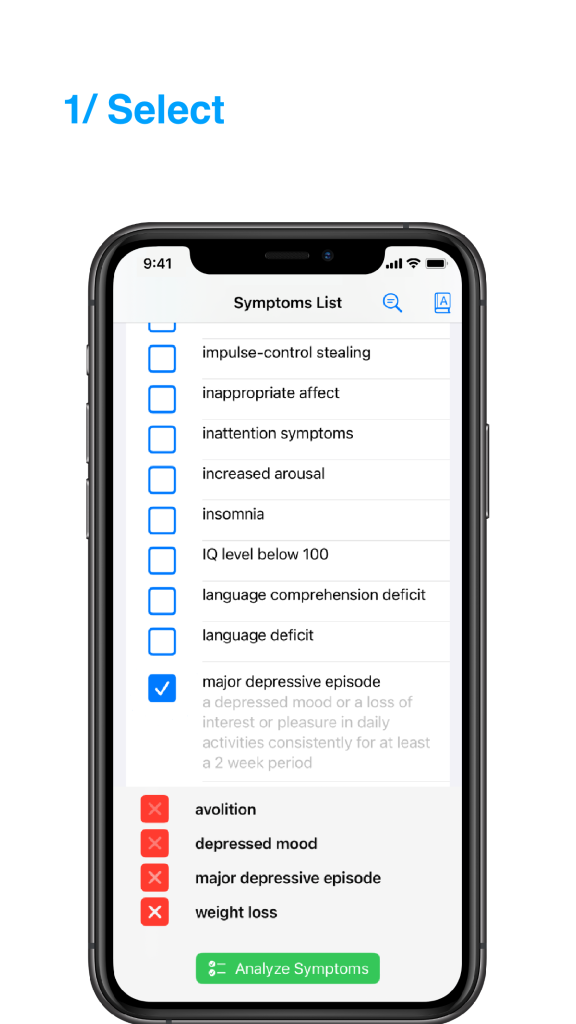
Psych 101

 Whether you practice psychiatry, psychology or you just want to know more about mental health.
Then Psych 101 is the application for you.
The Psych 101 App gives you all the knowledge you ever want to know on you iPhone.

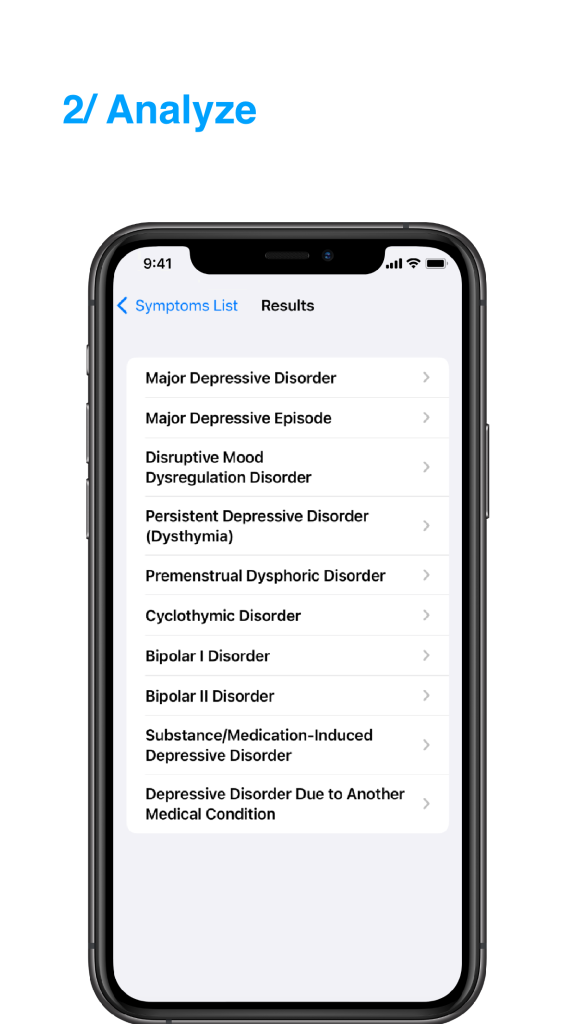
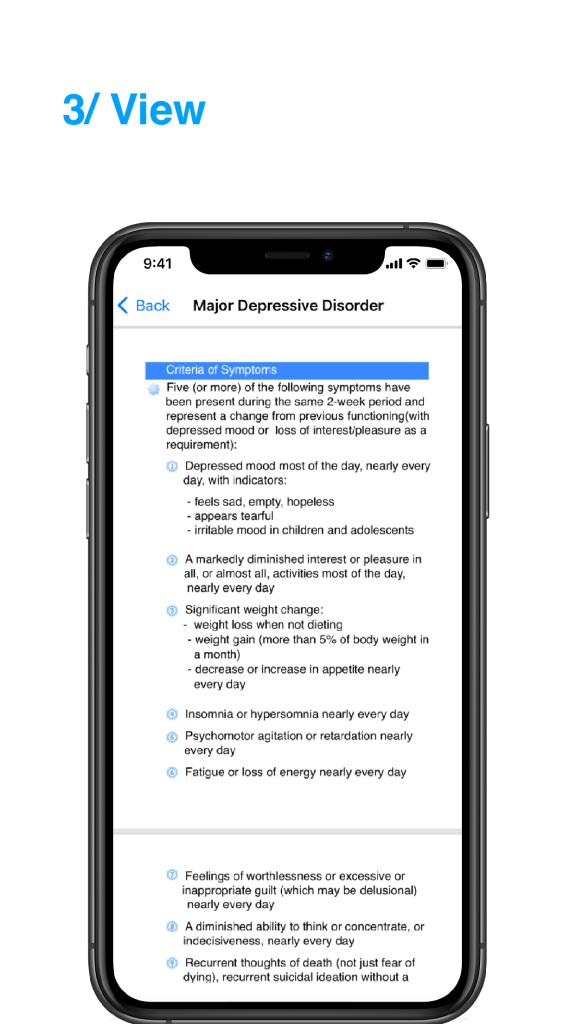
Like you want to know what the precise criteria is for a major depresive disorder, just typ in the word or scroll down to mood disorders.
Interested in phobias, no problem Psych 101 knows the answer.
What does it mean the have an Narcissistic Personality? Try Psych 101 and you’ll know.

Psych 101 list the all the disorders into Groups and Categories, just like the DSM or ICD.
This is displayed in the main category name (the pruple entry). Here you’ll find the quick criteria definitions of all the disorders belonging to the group or category.
If you want to know more about a certain disorder, you can search it by name (indented entry). This then will lead you to some detailed information about the disorder (yellow entry).

Demo video coming soon

Read More

Notes & Coins 101

Notes & Coins 101, the money encyclopedia is third app in the 101 series. This app contains all the current banknotes and coins of every country/land around the world.

For the readers who doubt this statement, I’ll list the containing countries.
Afghanistan,
Albania,
Algeria,
American Samoa,
Andora,
Angola,
Anguilla,
Antigue and Barbuda,
Argentina,
Armenia,
Aruba,
Australia,
Austria,
Azerbaijan,
Bahamas,
Bahrain,
Bangladesh,
Barbados,
Belarus,
Belgium,
Benin,
Berlize,
Bermuda,
Bhutan,
Bolivia,
Bosnia Herzegovina,
Botswana,
Brazil,
British Virgin Islands,
Brunei,
Bulgaria,
Burkina Faso,
Burma,
Burundi,
Cambodia,
Cameroon,
Canada,
Cape Verde,
Cayman Islands,
Central Africa,
Chad,
Chile,
China,
Christmas Island,
Cocos (Keeling) Islands,
Colombia,
Comoros,
Congo,
Cook Islands,
Costa Rica,
Côte d’Ivoire,
Croatia,
Cuba,
Cyprus,
Czech Republic,
Democratic Republic of the Congo,
Denmark,
Djibouti,
Dominica,
Dominican Republic,
East Timor,
Ecuador,
Egypt,
El Salvador,
Equatorial Guinea,
Eritrea,
Estonia,
Ethiopia,
Fiji,
Finland,
Frnace,
French Polynesia,
Gabon,
Gambia,
Gaza Strip,
Georgia,
Germany,
Ghana,
Greece,
Greenland,
Grenada,
Guam,
Guatemala,
Guinea-Bissau,
Guinea,
Guyana,
Haiti,
Honduras,
Hong Kong,
Hungary,
Iceland,
India,
Indonesia,
Iran,
Iraq,
Ireland,
Israel,
Italy,
Jamaica,
Japan,
Jordan,
Kazakhstan,
Kenya,
Kiribati,
Kuwait,
Kyrgyzstan,
Latvia,
Lebanon,
Lesotho,
Liberia,
Libya,
Liechtenstein,
Lithuania,
Luxembourg,
Macau,
Macedonia,
Madagascar,
Malawi,
Malaysia,
Maldives,
Mali,
Malta,
Marshall Islands,
Mauritania,
Mauritius,
Mexico,
Micronesia,
Moldova,
Monaco,
Mongolia,
Montenegro,
Montserrat,
Morocco,
Mozambique,
Namibia,
Nauru,
Nepal,
Netherlands Antilles,
Netherlands,
New Caledonia,
New Zealand,
Nicaragua,
Niger,
Nigeria,
Niue,
Norfolk Island,
North Korea,
Nothern Mariana Islands,
Norway,
Pakistan,
Palau,
Panama,
Papua New Guinea,
Paraguay,
Peru,
Philippines,
Pitcairn Islands,
Poland,
Portugal,
Puerto Rico,
Qatar,
Romania,
Russia,
Rwanda,
Sain Kitts and Nevis,
Saint Lucia,
Saint Pierre and Miquelon,
Saint Vincent and the Grenadines,
Samoa,
San Marino,
São Tomé and Príncipe,
Saudi Arabia,
Senegal,
Serbia,
Seychelles,
Sierra Leone,
Singapore,
Slovakia,
Slovenia,
Solomon Islands,
Somalia,
South Africa,
South Korea,
Soutn Georgia and the South Sandwich Islands,
Spain,
Sri Lanka,
Sudan,
Suriname,
Swaziland,
Sweden,
Switzerland,
Syria,
Tajikistan,
Tanzania,
Thailand,
The Bahamas,
Togo,
Tokelau,
Tonga,
Trinidad and Tobago,
Tunisia,
Turkey,
Turkmenistan,
Turks and Caicos Islands,
Tuvalu,
Uganda,
Ukraine,
United Arab Emirates,
United Kingdom,
United States of America,
United States Virgin Islands,
Uruguay,
Uzbekustan,
Vanuatu,
Vatican City,
Venezuela,
Vietnam,
Wallis and Futuna,
Yemen,
Zambia,
Zimbabwe.

Video coming soon


Read More